Email Footer Examples, Plus What the Law Requires You to Include
The footer is the one part of a marketing email with legal requirements attached. This covers what has to be in it, what earns its place, and four footers you can copy.
An email footer is the block at the bottom of a marketing email that carries the sender's identity, a working unsubscribe link, and a physical postal address. In the United States, these are legal requirements rather than conventions, and the rest of the footer is a design decision. The United Kingdom and the European Union set the requirements differently, which is covered below.
What Must an Email Footer Contain?
For commercial email sent to recipients in the United States, the CAN-SPAM Act sets the floor. Under 15 U.S.C. § 7704, a commercial message must carry all of the following:
- A valid physical postal address for the sender. Not a URL, not an email address. A real postal address.
- Clear and conspicuous notice that the recipient can decline further messages. This is the unsubscribe link, and "clear and conspicuous" is the operative phrase.
- Clear and conspicuous identification that the message is an advertisement or solicitation. This one has an exemption: it does not apply if the recipient gave prior affirmative consent to receive the message, which is why opted-in newsletters rarely carry an explicit "this is an ad" line.
There is a fourth requirement for your sending process, rather than your footer. Once someone opts out, continuing to email them more than 10 business days after the request is unlawful under the same section.
What Counts as a Valid Physical Postal Address?
The FTC's rule implementing CAN-SPAM defines it precisely. Under 16 CFR 316.2, a valid physical postal address means the sender's current street address, a Post Office box the sender has accurately registered with the United States Postal Service, or a private mailbox accurately registered with a commercial mail-receiving agency.
So a registered PO box is compliant, but a made-up address is not (duh!), and neither is omitting it because the email "is not marketing, as such."
What About the United Kingdom and the European Union?
Different rules, and they follow where your recipient is rather than where you are.
In the United Kingdom, the Information Commissioner's Office treats companies, limited liability partnerships and Scottish partnerships as "corporate subscribers," and the Privacy and Electronic Communications Regulations (PECR) rule on marketing by electronic mail does not apply to them. Sole traders and most other partnerships are treated as individuals, and it does apply. The UK GDPR applies either way whenever you process a named person's data, and recipients can object to direct marketing at any time, so an unsubscribe mechanism is required in practice regardless.
In the European Union, the GDPR and the ePrivacy Directive apply together and member states implement the ePrivacy rules in their own national law, so the detail varies by country.
A footer carrying a real postal address, a working unsubscribe link, and a clear sender identity satisfies the common denominator across all three.
What Else Belongs in a Footer?
Everything above is obligatory. Everything below is optional.
- Why this person is receiving the email. One line, such as "You are receiving this because you signed up at example.com" will reduce spam complaints more reliably than any design change, because a spam complaint is often just a recipient who doesn't remember why you're emailing them.
- A "manage preferences" link, if you have one. Someone who wants fewer emails is more valuable than someone who unsubscribes, and offering the choice may keep them around.
- Contact details that reach a human. Make sure the reply-to inbox is one that's monitored.
- Social icons, for any active (not dormant) accounts you keep.
- The company name and a small logo. The header already carried your brand; the footer is confirming who sent it, not selling again.
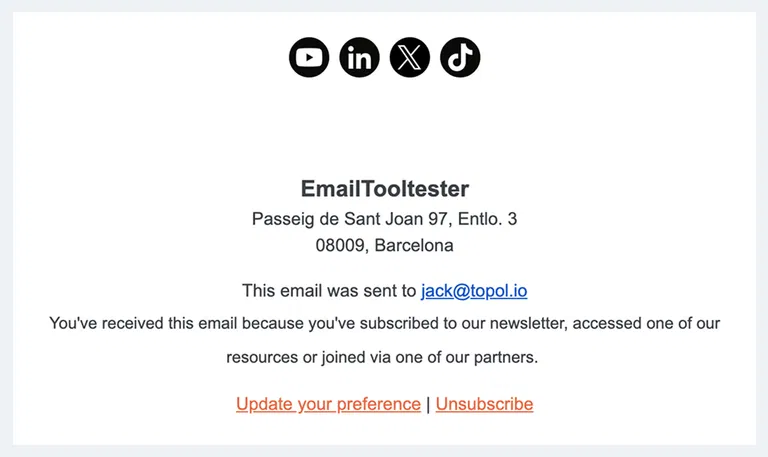
What does not belong: a second call to action competing with the one in the body, a full navigation menu, or a repeated hero image.
Four Email Footers You Can Copy
Each of these is text you can paste and adapt. Replace anything in square brackets.
A Marketing Newsletter Footer
[Company Name]
[Street address, city, postcode, country]
You are receiving this email because you subscribed at [example.com].
[Update your preferences] | [Unsubscribe]
[Twitter] [LinkedIn] [Instagram]
A SaaS Product Footer
[Product Name] by [Company Name]
[Street address or registered PO box]
You are receiving this because you have a [Product Name] account. This email relates to your account and your subscription settings.
[Notification settings] | [Unsubscribe from product updates]
Questions? Reply to this email and a person will answer.
Note the split in this one. Account and billing messages are transactional and are not subject to the same rules as marketing email, so keeping product updates on a separate, unsubscribable stream lets someone stop the marketing without losing the receipts they need.
An Ecommerce Footer
[Store Name]
[Street address, city, postcode, country]
You are receiving this because you shopped with us or signed up for offers at [example.com].
[Manage email preferences] | [Unsubscribe] | [Returns and shipping] | [Contact us]
[Instagram] [TikTok] [Facebook]
A Minimal Plain-Text Footer
[Company Name], [street address, city, postcode, country]
You signed up at [example.com]. [Unsubscribe]
The minimal version is compliant and it is the right choice for one-to-one and low-volume sending, where a designed footer signals a bulk send.
How Do You Write a Good Unsubscribe Link?
Make it a link, put it where people look for it, and honour it immediately.
- Use the word "unsubscribe." Recipients scan for that word. Clever alternatives like "adjust your journey with us" fail the "clear and conspicuous" test and irritate the person already trying to leave.
- Do not require a login to unsubscribe. Someone who cannot find their password will hit the spam button instead, and a spam complaint damages your sending reputation in a way an unsubscribe never does.
- Do not build the unsubscribe link as an image. Several clients block images by default, and an unsubscribe link that disappears when images are off is not clear and conspicuous. Build it as HTML text or a bulletproof button.
- Process it the same day. The law allows ten business days, but if recipients receive more emails after unsubscribing, you may leave them with a bad impression of your brand.
How Big Should an Email Footer Be?
The footer sits inside the same 600-pixel body as everything else in your email (this is the standard size), and 100 to 200 pixels of height covers most of what belongs in one. A logo at 100 to 150 pixels wide is plenty, since it is confirming the sender rather than introducing them.
The full set of constraints, including why 600 pixels is the standard width and why images need to be exported at double their display size, is in the guide to email image sizes for banners, headers and logos. The same rules apply at the bottom of the email as at the top; this is covered in our header design guide.
Does the Footer Work in Dark Mode?
Check it, because footers fail in dark mode more often than any other part of an email. The reason is that footers rely on grey text and transparent logos, and both are what dark-mode inversion handles worst.
Two failures to look for specifically: grey unsubscribe text that becomes unreadable against an inverted background, and a dark logo on a transparent background that vanishes entirely. For more on this topic, see our complete guide to designing emails for dark mode.
Footer Mistakes Worth Avoiding
- Copying the footer from an old template without reading it. Old addresses, dead social accounts, and the previous company name could easily creep in.
- Putting the physical address in an image. This is a legal requirement, so it should not depend on images loading.
- Leaving merge tags unresolved. A footer reading "You subscribed at *|SIGNUP_SOURCE|*" tells the recipient exactly how much attention the email received.
Frequently Asked Questions
What Should an Email Footer Include?
A physical postal address, a clear unsubscribe link, and an identification of who sent the message. Those three are legal requirements for commercial email in the United States. Beyond them, a line explaining why the recipient is receiving the email and a link to a preference centre are the two additions that earn their place most often.
Is a Physical Address Really Required in an Email?
For commercial email sent to United States recipients, yes. A registered Post Office box or a private mailbox registered with a commercial mail receiving agency both satisfy the requirement, so a home address is not the only option for a small team.
Do Transactional Emails Need an Unsubscribe Link?
Transactional and relationship messages, such as receipts, password resets, and shipping notifications, are treated differently from commercial email and are not subject to the same requirements. The test is the message's primary purpose, so a receipt with a promotional banner attached can stop being purely transactional.
Where Should the Unsubscribe Link Go?
In the footer, in the word "unsubscribe," at a readable size and contrast. Recipients look for it at the bottom, and putting it somewhere unexpected slows down the person who has already decided to leave.
How Long Do I Have to Honour an Unsubscribe?
Ten business days under United States law. Process it the same day anyway, because someone who receives another email after unsubscribing tends to reach for the spam button rather than the unsubscribe link a second time.
Do the Same Footer Rules Apply in Europe?
No. CAN-SPAM is United States law. In the United Kingdom the Privacy and Electronic Communications Regulations treat companies differently from sole traders, and the UK GDPR applies to both whenever you hold a named person's data. In the European Union the GDPR and the ePrivacy Directive apply together, and member states implement the ePrivacy rules in their own national law, so the detail varies by country. A footer with a real postal address, a working unsubscribe link and a clear sender identity satisfies the common denominator.
Takeaway
The footer carries three legal obligations and one job: to tell a recipient who you are, why they are hearing from you, and how to stop. Build it once, check it in dark mode with images disabled, and reuse it deliberately rather than inheriting it from whichever template was open last.
If you would rather not rebuild it every time, start your 14-days FREE trial and set the footer once as a saved block in Topol PRO.