Why Your Marketing Emails Land in Spam (Even With Good Content)
 Jakub Plas
Even great content lands in spam without email authentication. This guest post from DMARCeye walks through what DMARC is, why it now decides whether your campaigns reach the inbox, and four steps to fix your domain's setup.
Guest post by Jakub Plas, COO at DMARCeye.
A meaningful share of your email list may never see the emails you send them, for a reason has nothing to do with your content. Rooted deep in email authentication is a hidden deliverability problem, which most marketers have never been told about. This article covers what DMARC is, why it now decides whether your campaigns reach the inbox, and four concrete steps to get you set up for best email deliverability.
The Authentication Layer Underneath Your Campaigns
Before a receiving server (Gmail, Outlook, Apple Mail) ever looks at your subject line, image, or call-to-action, it asks a different question: is this email from who it claims to be from? If the answer is "we can't tell," the email gets filtered, deprioritized in AI-curated inboxes, or dropped into spam outright.
The check happens in milliseconds and the reader never sees it. But it explains why two campaigns with identical content can land in the inbox for one segment and in spam for another. The variable isn't the content, but the authentication signal attached to your domain.
This signal is what DMARC controls. And in 2026, publishing it correctly isn't optional.
What DMARC Does (in Plain English)
DMARC is a public record on your domain that tells receiving mail servers what to do when an email arrives claiming to be from you. Three short pieces of information sit in that record:
- SPF is the list of which servers are authorized to send mail on your behalf
- DKIM is the cryptographic signature proving the email wasn't tampered with in transit
- DMARC policy is your instruction to the receiving server about what to do when SPF and DKIM both fail: nothing (
p=none), send to spam (p=quarantine), or block outright (p=reject)
If you've never set this up, your domain is publishing the digital equivalent of "we don't know who's allowed to send as us, and we don't care if you trust them." Receiving servers respond to this signal the way you'd expect: they treat your mail as unverified.
The fix is straightforward but easily missed: you (or your IT team, or your domain registrar) publish the records once, then monitor them over time. The records live on the domain, not at your ESP (Email Service Provider, i.e., the platform you use to send marketing email, like Mailchimp, Klaviyo, Brevo, Ecomail, or Mailgun).
What Has Changed (and Why This Is Urgent Now)
Recent shifts have pushed authentication from "nice to have" to "required":
1. Google and Yahoo's bulk sender rules are now strictly enforced. Since early 2024, domains sending 5,000 or more messages per day to Gmail have had to publish SPF, DKIM, and DMARC records, keep their spam complaint rate under 0.3%, and offer one-click unsubscribe. As of late 2025, non-compliant bulk senders have been seeing their mail permanently rejected rather than filtered to spam. For senders of less than 5,000 emails per day, the bar is lower (Google requires SPF or DKIM, Yahoo requires both), but both providers now recommend publishing a full DMARC record at any volume, and major receivers increasingly use authentication signals as part of their broader inbox-placement decisions.
2. AI-prioritized inboxes deprioritize unauthenticated mail. Topol's piece on how AI changed email deliverability in 2026 covered tis topic on a broader scale. The short version: even when an unauthenticated email squeezes past the spam filter, Gmail's Gemini-powered triage and Outlook's equivalent rank it lower in the visible inbox. The reader may never scroll down to see it.
3. Most senders haven't caught up yet. DMARCeye's Q1 2026 industry report on email authentication found that roughly 60% of public-internet domains either have no DMARC record at all or are running their record in a monitor-only mode that tells receivers nothing about which mail to trust. To receiving servers, those domains are unverified.
But you're not late. The majority of senders competing for the same inbox slot are still working through this.
Why Your ESP Can't Do This Alone
The most common reaction to all this is "my ESP handles deliverability." In reality, it only handles half of it.
Your ESP (e.g. Mailchimp, Klaviyo, Brevo) handles the sending side: composing, routing, and pushing your messages out. Whether the receiving server trusts that email depends on records you (the sender) publish on your own domain. SPF is one of those records, and if your SPF record doesn't authorize your ESP's sending infrastructure, the receiving server can't verify that the email was allowed to be sent on your behalf. That's a fix on your end, not your ESP's.
The Q1 report's look at the top 10 ESPs by compliance shows how often this happens in practice. Mailchimp has 98.9% overall DMARC compliance but an 89.2% SPF fail rate on mail attributed to its network. Brevo (Sendinblue) has 99.5% compliance and a 93.1% SPF fail rate. Mailgun runs at 77.2% overall compliance. As the report itself notes, low compliance on a major provider is almost always a customer-side configuration problem, not a flaw with the provider itself.
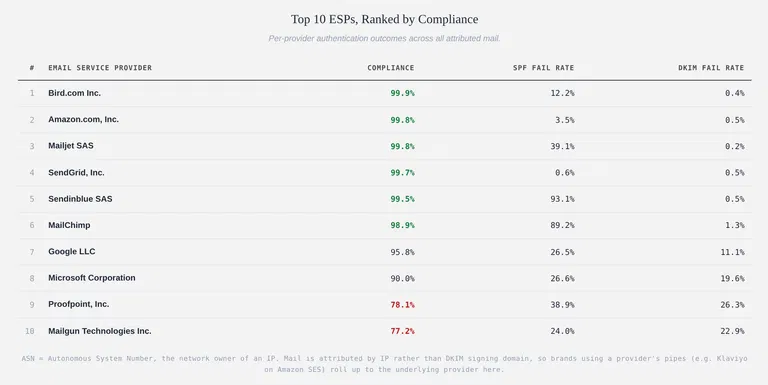
DMARCeye's Q1 2026 Research Report. Table showing top 10 ESPs by DMARC compliance, including Mailchimp, Brevo (Sendinblue), and Mailgun, with SPF and DKIM fail rates.
To send authenticated mail through your ESP, three records need to be published on your domain's DNS:
- An SPF record that names your ESP as one of the servers allowed to send mail for your domain
- A DKIM record that authorizes your ESP's cryptographic signing key
- A DMARC record that tells receiving servers what to do when those checks fail
If any one of these records is missing or misconfigured, the receiving server sees an email claiming to come from your domain but with authentication that fails to verify. The receiving server then looks at your DMARC policy to decide what to do with the email. If your DMARC policy is p=none, the receiver isn't required to filter or block the message based on the failed authentication. But the failure still counts against your sender reputation and, over time, repeated authentication failures lead to filtering and reduced inbox priority.
The customer-side gap is the most fixable problem in deliverability, and the one most marketers don't realize they own.
How to Fix Your Domain's Email Authentication
Four steps. Each is a finite project, not an ongoing program.
1. Check Your Current DMARC Posture
A free DMARC checker shows you what record (if any) your domain publishes, what policy you're on, and whether SPF and DKIM are aligned. The check takes 30 seconds. You can run it now with DMARCeye's free DNS checker. If your domain has no DMARC record, or shows p=none, you're in the 60% of senders without active enforcement.
2. Get the SPF and DKIM Records Right with Your ESP
Your ESP provides step-by-step documentation explaining the exact DNS records you need to publish on your domain. The records get published in your domain's DNS, which is typically managed by your IT team, your web developer, or whoever set up your domain originally. Ask them if you don't have access yourself. For every domain you send marketing emails from, your ESP needs to be authorized in your SPF record, and your DKIM keys need to be in place. After publishing the records, recheck your domain using the free DMARC checker from step 1 to verify everything is aligned.
3. Move from "Monitor Only" to "Actually Enforce"
Most domains with a DMARC record start in monitor-only mode, where the policy collects data but doesn't tell receiving servers to take any action when an unauthorized email shows up. The endpoint is full enforcement: receiving servers block forged mail outright. The middle stage should last for a few weeks, so you can catch any legitimate sending sources you'd forgotten about (HR tools, billing systems, internal newsletters). In DMARC terms: move from p=none to p=quarantine, then to p=reject.
4. Monitor Over Time
DMARC sends aggregate reports daily, in XML, to whichever address you specify. These reports tell you who's sending mail claiming to be from your domain, how many messages, and whether they passed SPF and DKIM. Reading raw DMARC XML is painful; tools exist to parse it into a dashboard. You can monitor your DMARC reports for free with DMARCeye if you want a clear view and guided next steps rather than spreadsheets.
If you design your campaigns in Topol, the content side is handled. Steps one through four are the layer underneath that lets the content reach the inbox.
Summary
The authentication layer is now the gate, not the content. Receiving servers and AI-curated inboxes decide where your campaign lands based on signals you publish on your domain, not on your subject line. Your ESP handles the sending half, but the customer-side records (SPF, DKIM, DMARC) are yours to set and monitor. Roughly 60% of public-internet domains haven't done this work, which means you don't need to be perfect to outperform the average sender. You just need to be authenticated. The work is finite, the tools exist, and the impact shows up in the metrics you're already watching.
Jakub Plas
Jakub Plas is COO at DMARCeye, a DMARC monitoring platform that helps teams diagnose and fix the email authentication issues that determine whether their campaigns reach the inbox.