BIMI for Designers: Getting Your Brand Logo Into Gmail's Inbox
 Jakub Plas
In Gmail's inbox list, your brand is a grayscale circle with your sender initials. BIMI replaces it with your logo. This guest post from DMARCeye walks through what BIMI is, what Gmail needs to display it, and the four steps to get your logo into the inbox list.
Guest post by Jakub Plas, COO at DMARCeye.
In Gmail's inbox list, your brand is represented by a grayscale circle showing your sender initials. The same circle, with different initials, sits next to every other unread message in the reader's inbox. BIMI replaces the grayscale circle with your brand logo. This article covers what BIMI is, what Gmail needs to display it, and the four steps to get your logo into the inbox list.
The focus throughout is Gmail, because Gmail is the receiver where BIMI is most consistently displayed and the requirements are clearly documented. A short comparison of other receivers is at the end.
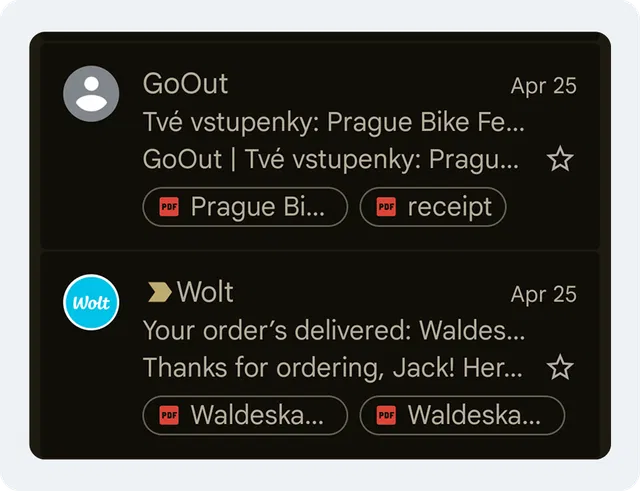
Example of BIMI display in inbox. Wolt has BIMI; GoOut doesn't.
What BIMI Does
BIMI (Brand Indicators for Message Identification) is a public DNS record on your domain that tells supporting receivers where to find your verified brand logo. When a Gmail user receives a message from your authenticated domain, Gmail looks up the BIMI record, fetches the logo file, validates it against a certificate, and displays the logo next to your sender name in the inbox list.
The mechanic is simple from a designer's perspective: you publish an SVG, point a DNS record at it, and Gmail uses it as the sender-row image instead of falling back to initials. The complexity is in the requirements Gmail validates before it agrees to display anything.
Why BIMI Sits on Top of DMARC
Gmail will not display your BIMI logo unless your domain's DMARC policy is at full enforcement: p=quarantine or p=reject, applied to 100% of your mail (no partial rollout). A domain at p=none (monitoring-only mode) does not qualify.
The logic is straightforward. BIMI is a brand-trust signal, and Gmail will not put your logo on the inbox row of a domain that has not proven it controls its own sending. DMARC enforcement is the proof. The same DMARC enforcement that protects inbox placement is what unlocks BIMI on top of it.
The DMARC step is the one most designers cannot do alone. The DMARC policy lives in DNS, typically managed by your IT team, your web developer, or whoever set up your domain. As a designer, your job at this stage is to find out where the domain currently stands so you can hand the result to whoever owns your DNS. Step 1 below covers the check.
VMC vs CMC: The Certificate Decision
Gmail requires more than a logo file and a DNS record. It also requires a certificate that vouches for your right to use the logo. There are two certificate options.
Verified Mark Certificate (VMC) is the original BIMI certificate. It requires a registered trademark with one of eight approved intellectual-property offices (USPTO, EUIPO, UK IPO, German DPMA, Japan Trademark Office, Spanish Patent Office, IP Australia, or the Canadian Intellectual Property Office). VMC issuers (DigiCert, Entrust, Sectigo, GlobalSign, SSL.com) verify the trademark before issuing the certificate. Annual cost ranges from roughly $750 to $1,500. Gmail rewards VMC-backed domains with a blue checkmark next to the logo.
Common Mark Certificate (CMC) is the newer option, supported by Gmail since September 2024. It does not require a registered trademark. Instead, the issuer verifies that your logo has been publicly displayed on your domain for at least 12 months, using internet archives as evidence. Annual cost is roughly $650 to $1,100. The logo displays in Gmail, but there is no blue checkmark.
For a designer making the decision: if your brand has a registered trademark and you want the blue checkmark, get a VMC. If your trademark is pending or you do not plan to register one, CMC is faster and cheaper, and your logo still appears.
Both certificate types are issued as PEM files. Gmail requires the PEM file to be hosted on your domain and referenced in the BIMI record.
The Logo File Itself
Gmail accepts logos in SVG Tiny P/S format (also called SVG Tiny PS, short for Tiny Portable/Secure). The format is a stricter profile of SVG Tiny 1.2, designed to be safe for receivers to render at scale.
A normal SVG exported from Figma or Illustrator is rarely compliant on the first pass. The specification forbids anything that could be a security risk in a receiving server, and the constraints are tight:
- Square aspect ratio (1:1 viewBox)
- Minimum 96 pixels by 96 pixels
- Maximum file size 32 kilobytes
- Solid background color (transparent backgrounds render unpredictably)
baseProfile="tiny-ps"attribute on the root SVG elementversion="1.2"attribute- A
<title>element with the brand name, 65 characters or fewer - No scripts, no animations, no external references, no embedded raster images, no linked fonts
In practice, this means producing a separate SVG file specifically for BIMI rather than reusing your standard brand-mark export. You crop the logo to a square, simplify any paths that depend on external resources, embed the type as outlines, and add the required SVG attributes by hand or via a BIMI-specific tool. The BIMI Group's logo guide covers the conversion path in detail.
How to Add BIMI to Your Domain
The work breaks into four steps. Some take 30 seconds; some take weeks. The whole project is finite, not an ongoing program.
Get Your Domain to DMARC Enforcement
Run a 30-second check on your domain with DMARCeye's free DNS checker to see your current DMARC policy. If the result is already at p=quarantine or p=reject, BIMI eligibility is open and you can move to step 2.
If the result is p=none or no record at all, moving the policy is not the designer's job. Hand the DNS-checker output to your IT team, your DNS administrator, or a DMARC monitoring service. They will typically run the domain at p=quarantine for a few weeks first to catch any legitimate sending sources that need to be authorized (HR tools, billing systems, internal newsletters), then move it to p=reject. BIMI eligibility unlocks at either policy.
Prepare a BIMI-Compliant SVG
Take the square version of your brand mark (the icon, not the wordmark) and rework it to the SVG Tiny P/S specification listed above. Crop to a 1:1 viewBox. Add a solid background color. Outline any text. Add the baseProfile="tiny-ps", version="1.2", and <title> attributes.
Validate the file before publishing. The BIMI Group's record generator checks SVG validity as part of the record-generation flow.
Get a Certificate (VMC or CMC)
Decide between VMC and CMC based on your trademark status and your appetite for the Gmail blue checkmark. Apply to one of the five approved issuers (DigiCert, Entrust, Sectigo, GlobalSign, SSL.com). Validation takes 1 to 3 weeks for VMC, longer if the issuer needs additional trademark evidence. CMC validation takes 1 to 2 weeks.
You will receive the certificate as a PEM file. Host it on an HTTPS endpoint on your own domain.
Publish the BIMI Record
The BIMI record is a DNS TXT entry, added by whoever owns your DNS rather than the designer. The job at this stage is to hand off the two URLs the DNS owner needs to publish: the URL where your SVG is hosted and the URL where your PEM certificate is hosted.
If your DNS owner would rather not write the record by hand, the BIMI Group's record generator builds a valid record from those two URLs and hands back the line to publish.
Once the record is live, verify it with DMARCeye's free BIMI checker. A working record validates the SVG format, confirms the certificate is valid, and confirms your DMARC policy meets Gmail's requirements. Gmail's display can take a few days to propagate after the record goes live.
Where the Logo Shows Up (and Where It Doesn't)
Gmail is the most consistent receiver, but it is not the only one. Here is the current state across major mailbox providers:
| Receiver | Logo displayed? | Certificate needed |
|---|---|---|
| Gmail | Yes | VMC (with blue checkmark) or CMC (no checkmark) |
| Apple Mail (iOS 16+, macOS Ventura+) | Yes | VMC required |
| Yahoo Mail | Yes | None required; VMC recommended |
| Outlook (consumer and Microsoft 365) | No | Microsoft confirms BIMI is not supported as a receiver; no roadmap commitment |
The Outlook gap is the one designers ask about most often. Microsoft's own staff have stated on the Microsoft Learn Q&A platform that "Microsoft supports BIMI as a sender, but not as a receiver," and there are no published roadmap items for changing that position. Plan as if Microsoft support is not coming. The work still pays off in Gmail, Apple Mail, and Yahoo, which together cover the majority of consumer inboxes.
One more piece of context: A sample of recent scans on DMARCeye's free BIMI scanner shows that roughly one in five domains queried by senders investigating their own BIMI status is still at p=none or has no DMARC record at all, meaning the senders are curious about BIMI before the foundation is in place. The brands with a working BIMI implementation are competing in a near-empty field, which is a gap that's unlikely to last.
Summary
BIMI is the only above-the-fold visual brand element available in the inbox preview. Three pieces sit between you and the logo display: a DMARC policy at p=quarantine or p=reject, an SVG Tiny P/S logo file that passes validation, and (for Gmail and Apple Mail) a VMC or CMC. Once this is done, it does not need ongoing attention. While the vast majority of senders are still represented in the inbox by a gray circle with their initials, the senders who have done the work get the brand mark.
For monitoring the DMARC reports that make BIMI eligibility possible (and that surface every misaligned send before it costs you), DMARCeye offers a free tier and a guided enforcement workflow.
Jakub Plas is COO at DMARCeye, a DMARC monitoring platform that helps teams diagnose and fix the email authentication issues that determine whether their campaigns reach the inbox.
Jakub Plas
Jakub Plas is COO at DMARCeye, a DMARC monitoring platform that helps teams diagnose and fix the email authentication issues that determine whether their campaigns reach the inbox.